 Walkthrough
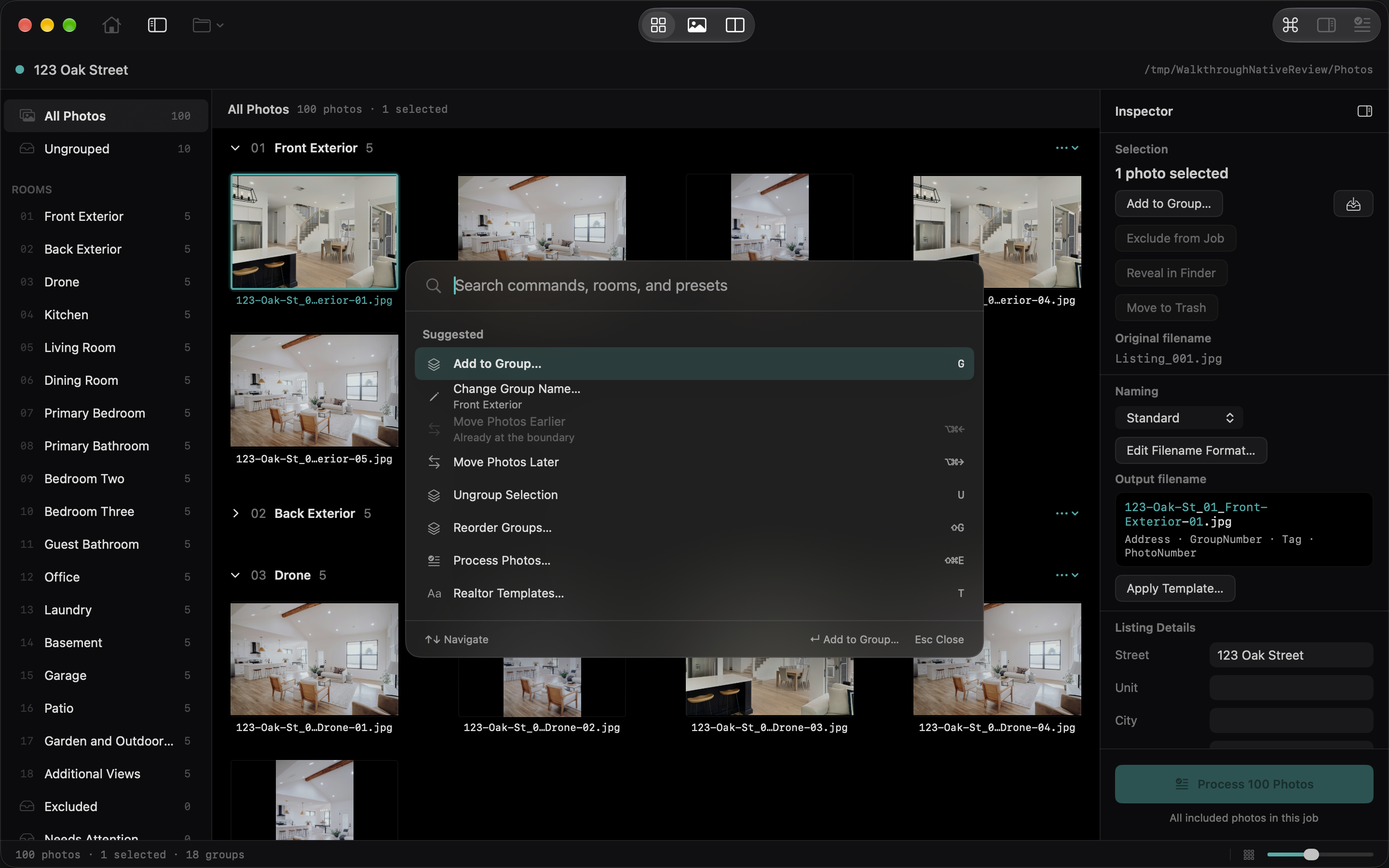
Press ⌘K, choose Commands in the toolbar, or use the menu command. The palette opens in the center of the window, with search ready for typing: search is case-insensitive and accepts partial and approximate matches. Results include actions, room groups, tags, naming presets, templates, and recent jobs.
Use Up/Down to choose a result and Return to run it, or click a row. The footer names the action Return will perform. From Home, suggestions include opening a folder, Settings, help, and recent jobs. Escape or clicking outside dismisses the palette without acting and returns you to your previous focus. Unavailable actions explain what is missing, such as a selection.
Go to Kitchen selects Kitchen in the sidebar and shows only that room in Contact Sheet. Add selected photos to Kitchen changes the selected photos’ group. These are separate actions. Process opens the review dialog; it does not immediately write files. Recent jobs reopen through the same restore behavior as the Open menu.
Search for actions and saved destinations, rather than individual photo filenames. The palette does not interpret requests with AI.